
A New Creative Workflow for 3D Artists with Maxon Plus
Every artist works differently. Some find their joy in sculpting every detail by hand. Others thrive on assembling, animating and transforming elements into something new. With the launch of Maxon Plus, Maxon brings both kinds of artists a set of connected creative services that offer AI-enabled help where it adds value, and step aside where it does not.
Maxon Plus is not a replacement for the tools you know. It is a new layer around them: AI-assisted creation, faster look development and a far simpler way to collect feedback, all working with Cinema 4D and ZBrush.
What is Maxon Plus?
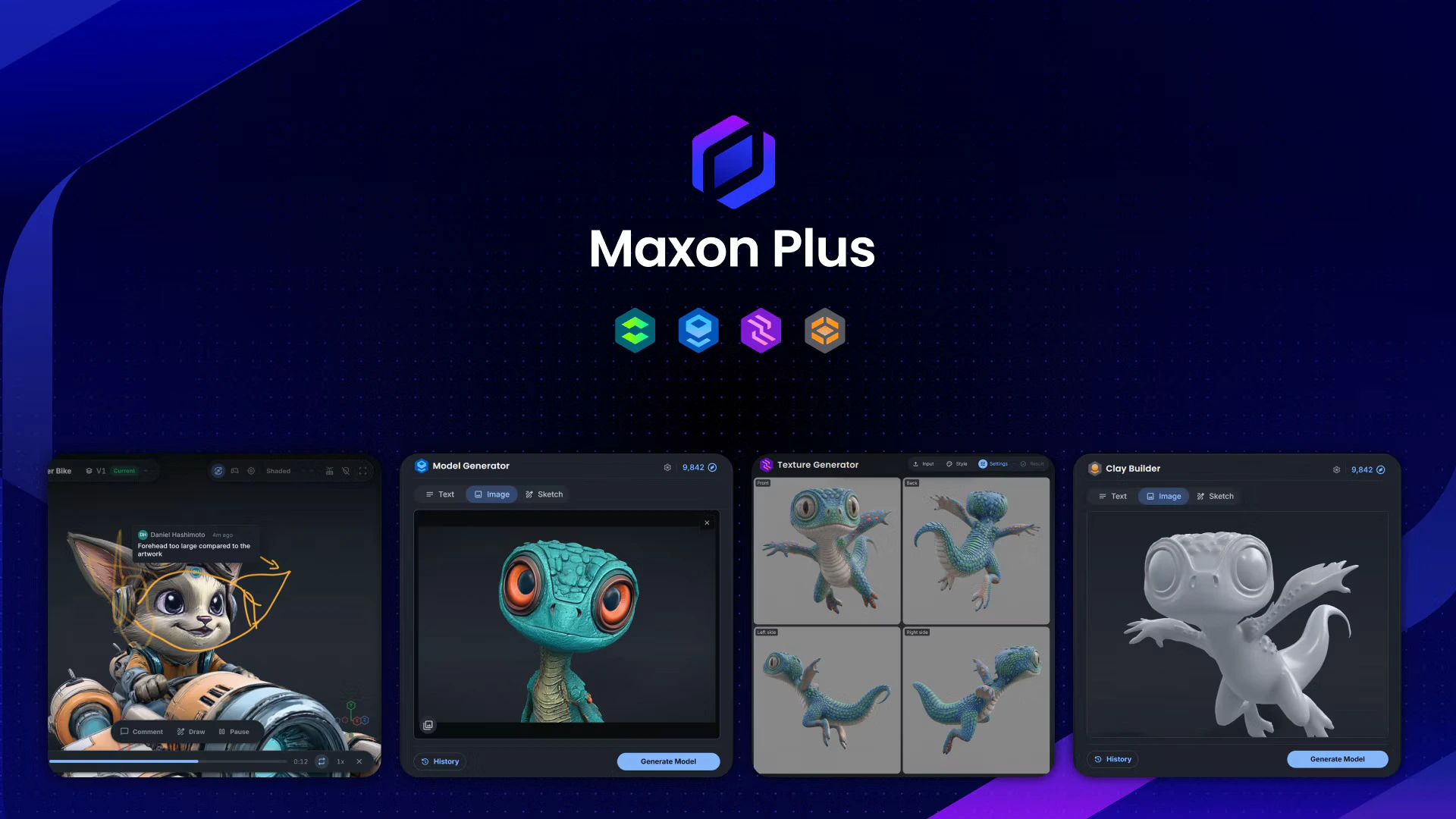
Maxon Plus is a new suite of connected creative services from Maxon, built to give artists and teams AI-assisted 3D creation and browser-based 3D review while keeping the artist in full control of the final result. It launches with four services: Model Generator, Texture Generator, Clay Builder and Maxon Review.
The approach is simple. Use AI-assisted tools when they help you move faster. Refine and direct the final result in the Maxon tools you already use. Or switch AI features off entirely. You and your team decide how AI fits into your pipeline, not the other way around.
Three of the four services run entirely in your browser, so a Maxon Plus subscription is all you need to start. If you already work in Cinema 4D or ZBrush, Maxon Plus connects to both. You can explore the platform at plus.maxon.net or watch the launch video to see the services in action.
What does Model Generator do?

Model Generator turns a written idea, a sketch or a reference image into a 3D base model that you can inspect, refine and make your own. It is a starting point for your craft, not a finished product.
You can run it as a web application through Maxon Plus with no installation, or directly inside Cinema 4D, where the output is remeshed using Cinema 4D's own technology. Before you generate, you can preview and art-direct the model, so the result is closer to what you had in mind. It works especially well for props, background objects, furniture and parts of larger models, which means you can spend less time blocking out supporting assets and more time on the hero of your scene.
For concept exploration and asset variations, the shift is significant. Moving from idea to a usable 3D form takes minutes instead of hours, and you still finish the work with the tools you trust.
How does Texture Generator help with look development?

Texture Generator helps artists explore new looks for models they already have, including models sculpted by hand. Describe a surface, or share a reference image, and it generates PBR textures for your asset.
A few details make it genuinely useful in production:
- Multiple directions on one asset. Test several looks on the same model before committing to final production.
- Camera-guided placement. Use text prompts, reference images and front, back and side camera views to guide where textures land.
- Flexible UVs. AI-generated UVs are the default, and you can choose to keep your existing UVs instead.
- Per-component control in Cinema 4D. Sub-components of a model can be textured individually, which makes it easy to create variations.
Like Model Generator, it is available in your browser through Maxon Plus or directly inside Cinema 4D, so you can keep refining in your own workflow. A second walkthrough video shows how these tools come together.
What is Clay Builder?

Clay Builder generates simple, untextured, low-polygon base meshes that are ready for subdivision, DynaMesh and sculpting. It gives sculptors a head start and the freedom to explore several ideas before choosing which one to take forward.
It is available as a web application through Maxon Plus and directly in ZBrush for iPad 2027.1. For artists who sculpt on the go, that means starting from a clean, workable form on the same device where the sculpting happens.
How does Maxon Review simplify 3D feedback?

Maxon Review is a browser-based service for asynchronous review and approval of video, stills and interactive 3D assets. Feedback is pinned to the exact location and perspective being reviewed, so nothing gets lost in translation.
Anyone who has sat through a review call knows how much time goes into simply getting everyone to look at the same thing. Maxon Review removes that friction:
- Comment directly on 3D. Collaborators can explore interactive 3D models and leave feedback right on the surface or angle in question.
- Work across time zones. Teams can review on whatever schedule suits them, without needing to be online at the same time.
- Feedback returns to where the work happens. In Cinema 4D, comments arrive with their viewport annotations and restore the exact view the reviewer was referencing. In ZBrush on desktop, they open in a floating window.
Maxon Review is currently in Public Preview and uses no credits during the preview period, so teams can try it with no added cost.
How does Maxon protect artists' work when using AI?

Maxon prohibits its third-party AI providers from using artists' content, prompts and other user data, including derivatives of that data, to train generative AI models. Maxon also tells users which provider powers each feature.
The control stays with you. Artists can switch off AI features across their account, covering local and cloud-based AI as well as all Maxon Plus cloud services.
How does Maxon Plus pricing and credits work?
Maxon Plus is a separate monthly subscription, offered in packs that each include a monthly allocation of credits. Generative AI features use those credits, and the number of credits an operation needs is always shown before you generate. Credits refresh every month and do not roll over.
A few points are worth knowing before you start:
- Maxon Plus is not included in Cinema 4D, ZBrush or Maxon One subscriptions.
- A Maxon product subscription is not required. Anyone with a Maxon account can purchase Maxon Plus packs and use the services on the web.
- AI features such as Model Generator and Texture Generator are available only to users aged 18 and over.
Who should explore Maxon Plus?
Maxon Plus suits any creator or team that wants faster ideation without giving up craft. Motion designers can populate scenes with props and background assets quickly. Sculptors can begin from clean base meshes. Look development artists can test many surface directions in one sitting. Studios and freelancers can bring clients into a review process that does not depend on a live call.
As Maxon puts it, technology should amplify human creativity, not replace it. Maxon Plus is built on exactly that idea: generate the start, craft the finish.
Talk to ARK about Maxon
ARK Infosolutions is the authorised distributor of Maxon in India. To understand how Maxon Plus, Cinema 4D, ZBrush and the wider Maxon ecosystem can fit into your studio or team, write to us at maxon@arkinfo.in.